

This package utilizes various viz packages (currently dittoViz and plotthis along with native plotting functions) to create interactivity-first Shiny modules for common plot types, designed to serve as building blocks for Shiny apps and as the basis for more complex/specialized modules.
These modules contain all possible functionality for each plot with some additional parameters that make use of the interactive features of plotly, e.g. interactive text annotations, arbitrary shape annotations, multiple download formats, etc.
The modules provide comprehensive plot control for app users, allowing for convenient aesthetic customizations and publication-quality images. They also provide developers a way to dramatically save time and reduce complexity of their plotting code or a flexible base to build more specialized Shiny modules upon.
# CRAN
install.packages("VizModules")

# Development version
remotes::install_github("j-andrews7/VizModules")shiny::runApp(system.file("apps/module-gallery", package = "VizModules"))VizModules::figureBuilderApp()vignette("quick-start", package = "VizModules")To use a module in your own app, simply call the
*InputsUI(), *OutputUI(), and
*Server() functions for the module you want to use. For
example, to use the ScatterPlot module from dittoViz, you would do
something like this:
library(VizModules)

ui <- fluidPage(
    sidebarLayout(
        sidebarPanel(
            dittoViz_scatterPlotInputsUI(
                "cars",
                mtcars,
                defaults = list(
                    x.by = "wt",
                    y.by = "mpg",
                    color.by = "cyl"
                )
            )
        ),
        mainPanel(dittoViz_scatterPlotOutputUI("cars"))
    )
)

server <- function(input, output, session) {
    dittoViz_scatterPlotServer(
        "cars",
        data = reactive(mtcars)
    )
}

shinyApp(ui, server)
Every module uses the same trio of functions:
*InputsUI() for controls, *OutputUI() for the
plot, and *Server() for the logic. The separation of
InputsUI and OutputUI allows you to place input controls and the actual
plot wherever you’d like.
Use defaults to pre-fill inputs, and
hide.inputs/hide.tabs to hide controls while
keeping their values so you can enforce app-level defaults without
exposing them. A defaults entry can also be a
reactive(), so an input follows your app’s state without an
extra re-render.
Modules built on plotting functions from other packages expose most
of the underlying arguments. The module input help pages (e.g.,
?dittoViz_scatterPlotInputsUI,
?plotthis_AreaPlotInputsUI) list what is wired through and
any omissions; cross-reference the underlying plot docs
(?dittoViz::scatterPlot, ?plotthis::AreaPlot,
etc.) to see the full parameter set.
Every module has a corresponding *App() function that
creates a complete Shiny app showcasing the module’s functionality with
example data. For instance, plotthis_BarPlotApp() creates
an app BarPlot module. You can run these apps directly to explore the
module’s features and see how it works in a full Shiny context.
library(VizModules)
# Using built-in example data (or upload your own file in the app)
plotthis_BarPlotApp()

# Providing your own data
df <- data.frame(
    category = c("A", "B", "C"),
    value = c(10, 20, 15),
    group = c("X", "Y", "X")
)

plotthis_BarPlotApp(data = df)Every built-in *App() convenience function
(e.g. plotthis_BarPlotApp(), linePlotApp()) is
a thin wrapper around createModuleApp() with sensible
default data. You can also pass your own custom wrapper module functions
to createModuleApp() for rapid prototyping after defining
the UI and server functions. All *App() wrappers and
createModuleApp() accept defaults,
hide.inputs, and hide.tabs so you can pre-fill
or hide controls when testing a module in isolation; see vignette("defaults-and-hiding", package = "VizModules").
library(VizModules)

app <- createModuleApp(
    inputs_ui_fn = plotthis_BarPlotInputsUI,
    output_ui_fn = plotthis_BarPlotOutputUI,
    server_fn    = plotthis_BarPlotServer,
    data_list    = list("cars" = mtcars),
    title        = "My Bar Plot"
)

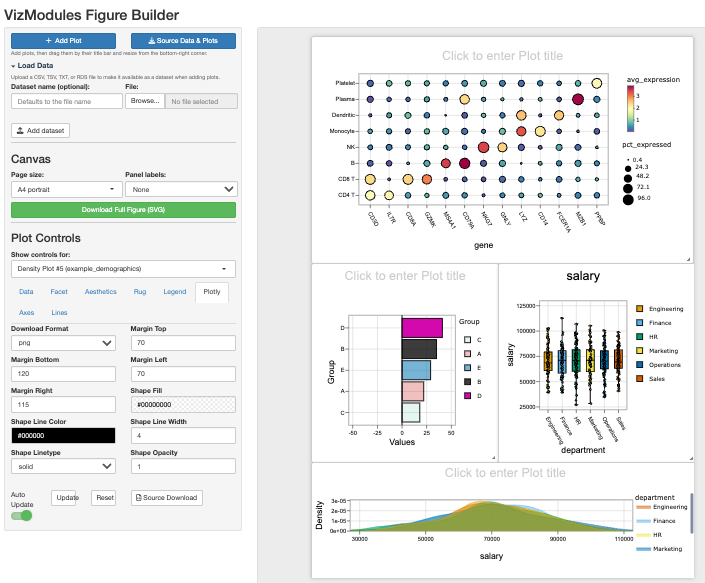
runApp(app)The Figure Builder is now a fully reusable,
namespaced Shiny module (figureBuilderUI() /
figureBuilderServer()) that turns the plot modules into a
free-form figure builder. It can be launched as a standalone app,
embedded inside a larger app, or even instantiated more than once on a
single page. Launch the standalone app with
figureBuilderApp():
library(VizModules)

# Launch with the bundled example datasets and all modules
figureBuilderApp()

# Or seed it with your own datasets
figureBuilderApp(data_list = list("iris" = iris, "mtcars" = mtcars))
figureBuilderApp() accepts data_list to
seed datasets, module_registry to add custom modules, and
return_components = TRUE to get separate
ui/server objects instead of a
shinyApp(). See ?figureBuilderApp for
details.
Or try the hosted example.
The Figure Builder is also a self-contained Shiny module, so you can
embed it in a larger app (and even use more than one instance on a page)
with figureBuilderUI() /
figureBuilderServer(), just like the plot modules:
library(VizModules)

ui <- fluidPage(
    figureBuilderUI("figure_builder")
)

server <- function(input, output, session) {
    figureBuilderServer("figure_builder")
}

shinyApp(ui, server)
It allows you to interactively compose complicated figures using the modules in a single page:
CSV, TSV or
RDS file. Uploaded datasets are added to the dataset list
so you can build plots from your own data alongside the bundled
examples. Each plot can use a different dataset if desired.shinyjqui) — resizing adjusts the plot in both directions.
The toolbar stays out of the way otherwise, so cards remain clean and
chrome-free in the SVG export.A,
B, C, … or lowercase a,
b, c, …) to the top-left of each panel. Labels
now render live on the canvas as soon as they are chosen (and renumber
as panels are added, removed, or dragged), in addition to appearing in
the SVG export. Labels are ordered the way a reader scans a figure —
top-to-bottom by row, then left-to-right within a row. Choose
None to leave the figure unlabelled..zip containing all plot
data (plot + data + the inputs used to build it + statistical testing
information (if applied)) for every plot on the canvas, with one set of
files per panel.The modules in VizModules are designed to be
composed and extended. You can build higher-level modules that add
custom logic while reusing the full functionality of the base modules.
Many internal helpers for axes, faceting, and layouts are now exported
to support this, along with the
defaults/hide.inputs/hide.tabs
controls covered in vignette("defaults-and-hiding", package = "VizModules").
For more details, see vignette("custom-modules", package = "VizModules").
Beyond the standard shiny::*Input widgets,
VizModules ships two reusable custom Shiny inputs that
are used throughout the package and are available for your own apps:
multiColorPicker() and multiDynamicInput().
See vignette("custom-shiny-inputs", package = "VizModules")
for full details.
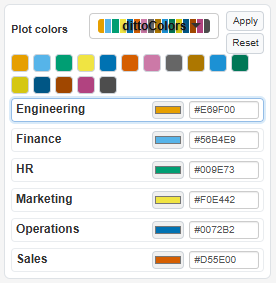
multiColorPicker() assigns a color to
each level of a discrete variable, either by applying a named palette to
every group at once or by fine-tuning individual groups with a color
picker and an editable hex field. It returns a named character vector of
hex colors keyed by group and can be updated from the server with
updateMultiColorPicker().
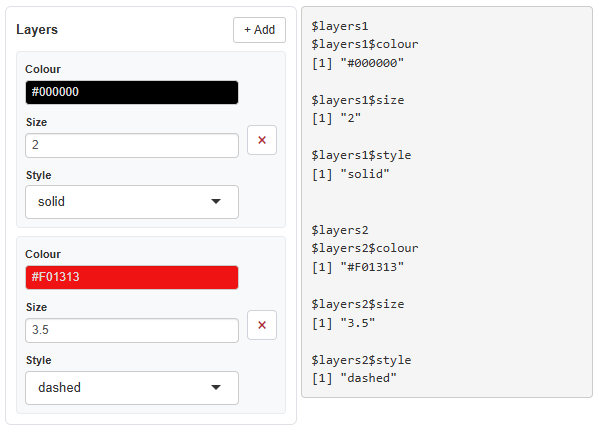
multiDynamicInput() is a
general-purpose widget that lets users dynamically add and remove rows
of heterogeneous inputs (e.g. a color, a numeric, and a select per row).
It returns a named list of rows and can be updated from the server with
updateMultiDynamicInput().
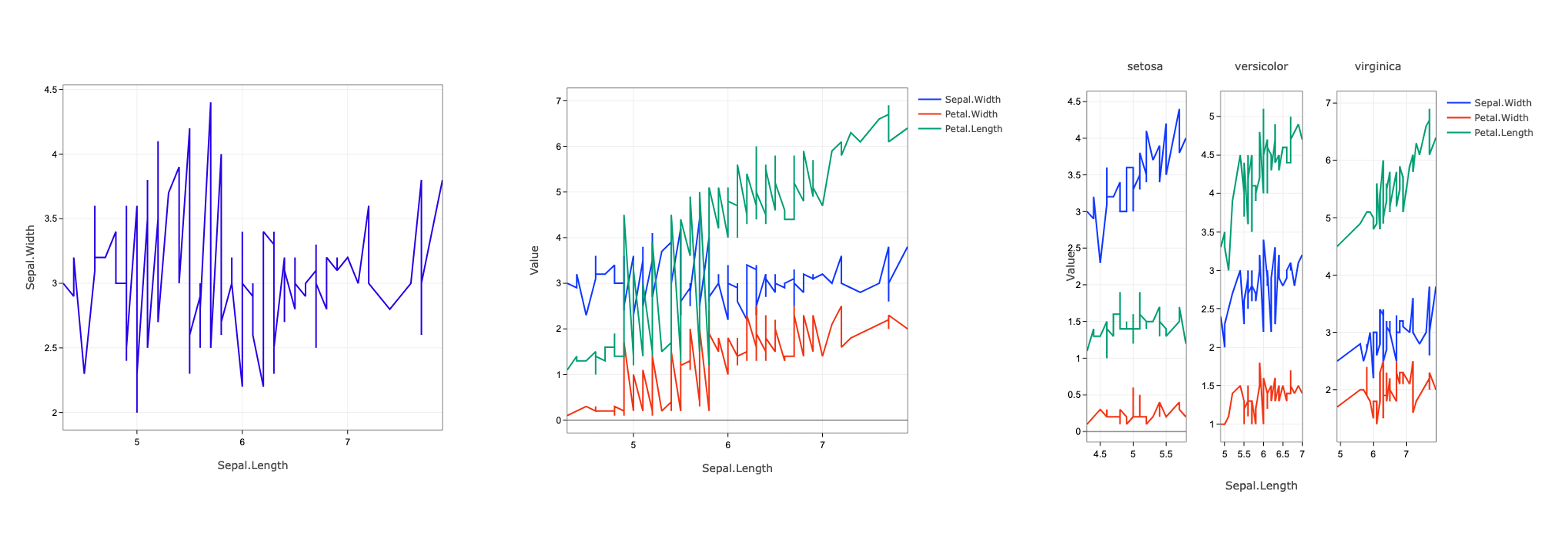
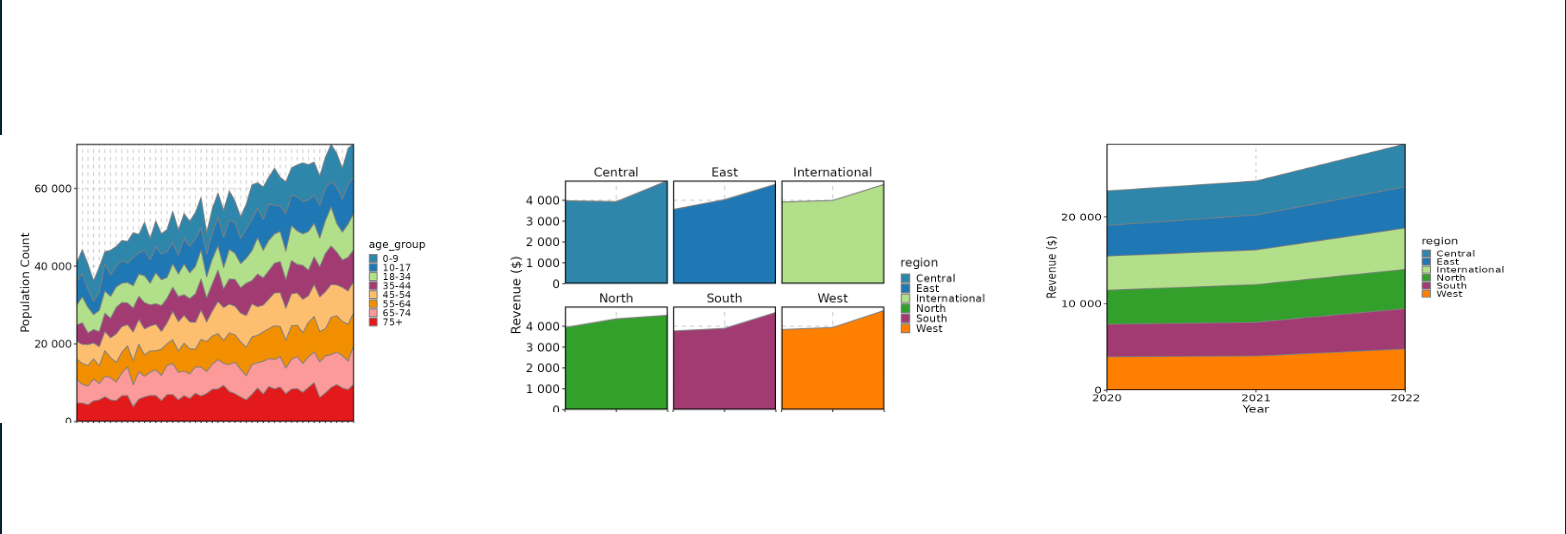
Currently, VizModules contains a functional Shiny module for the following visualization functions:
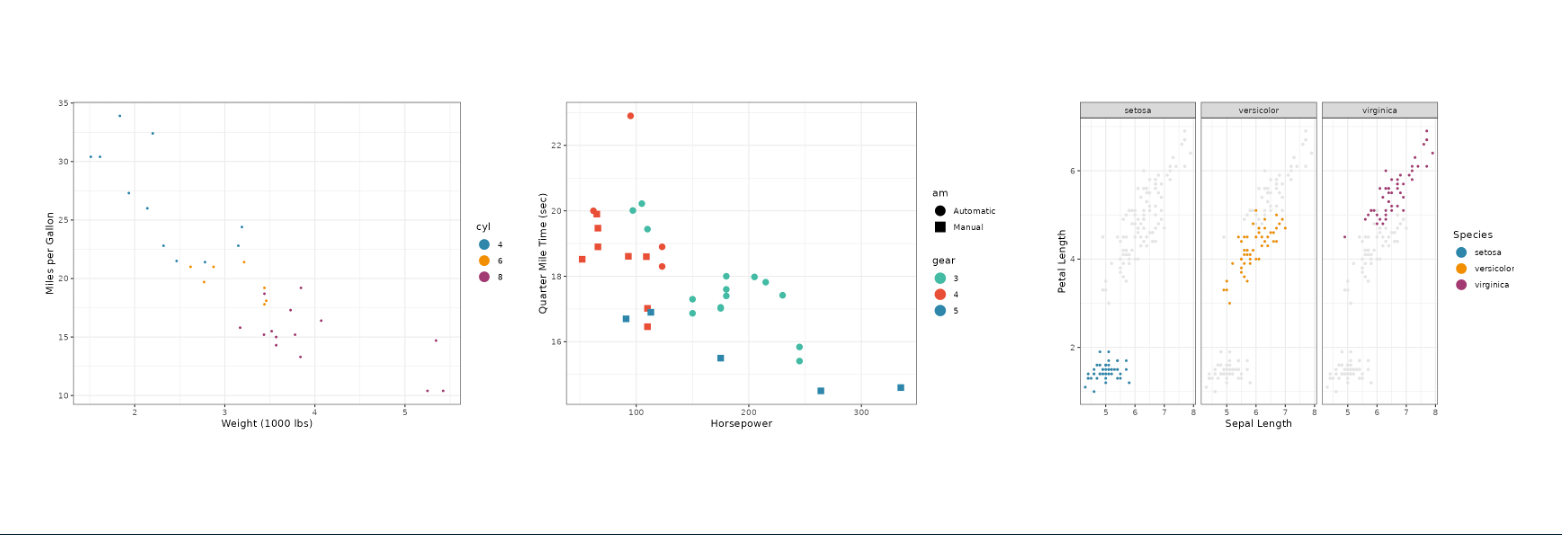
dittoVizdittoViz_scatterPlot - x/y coordinate plots with
additional color and shape encodings (wraps
dittoViz::scatterPlot). Supports overlaying fit lines,
including multiple custom model lines defined
interactively: add a row per model, each with its own R model formula
(e.g. revenue ~ poly(units, 2)), fitting function
(lm, glm, loess,
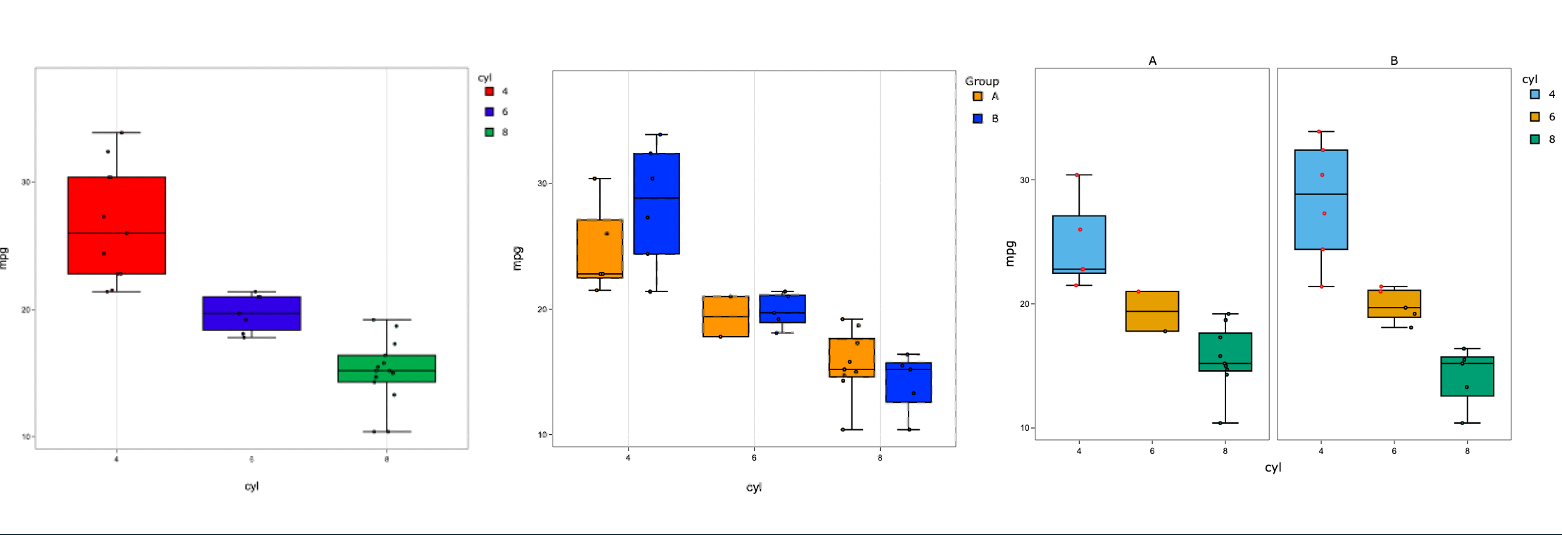
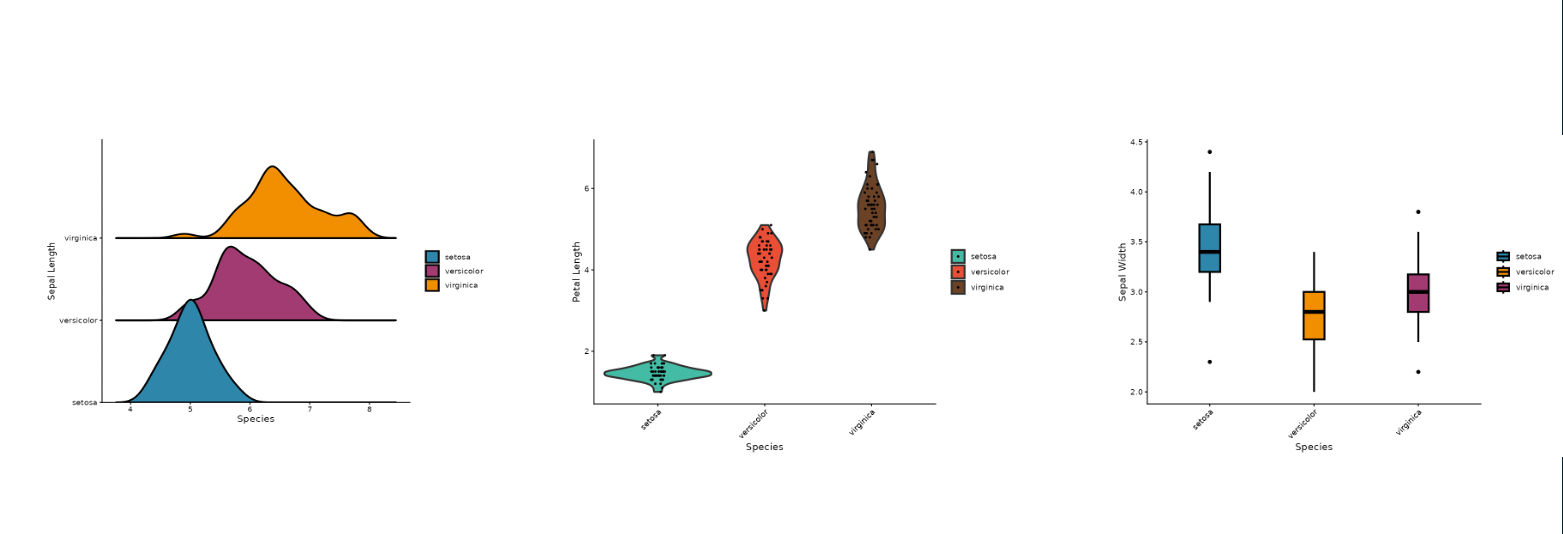
nls), line colour, and width, see vignette("custom-model-lines", package = "VizModules").dittoViz_yPlot - Multi-variate Y-axis plots (boxplot,
jitter, violinplots - wraps dittoViz::yPlot).plotthisplotthis_AreaPlot - Stacked area charts (wraps
plotthis::AreaPlot).plotthis_ViolinPlot - Violin plots (wraps
plotthis::ViolinPlot).plotthis_BoxPlot - Box plots (wraps
plotthis::BoxPlot).plotthis_BarPlot - Bar charts (wraps
plotthis::BarPlot).plotthis_SplitBarPlot - Split bar charts (wraps
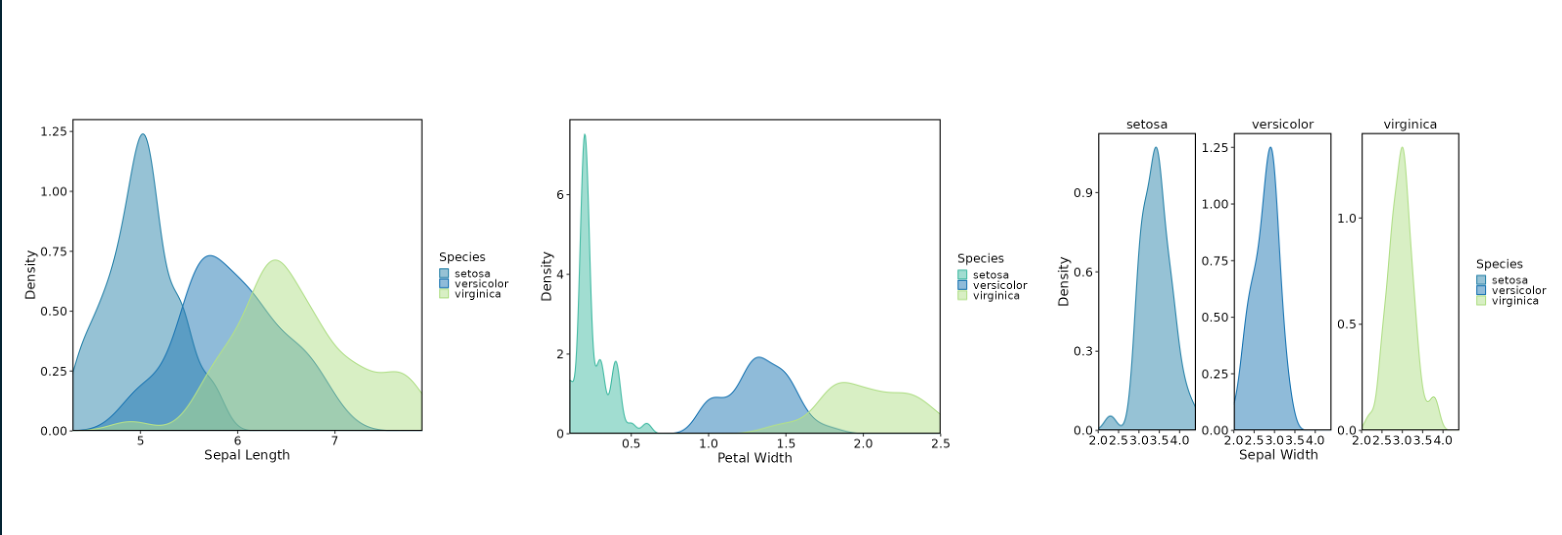
plotthis::SplitBarPlot).plotthis_DensityPlot - Density plots (wraps
plotthis::DensityPlot).plotthis_DotPlot - Dot plots (wraps
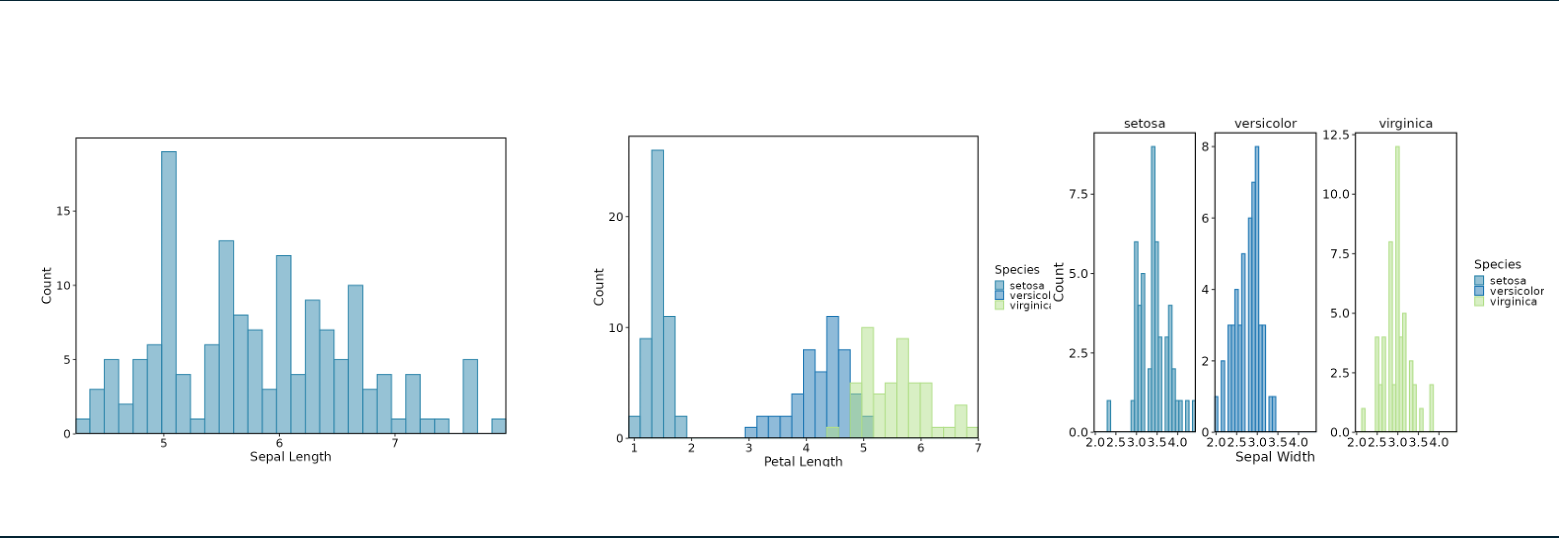
plotthis::DotPlot).plotthis_Histogram - Histograms (wraps
plotthis::Histogram).Via direct implementation with plotly.
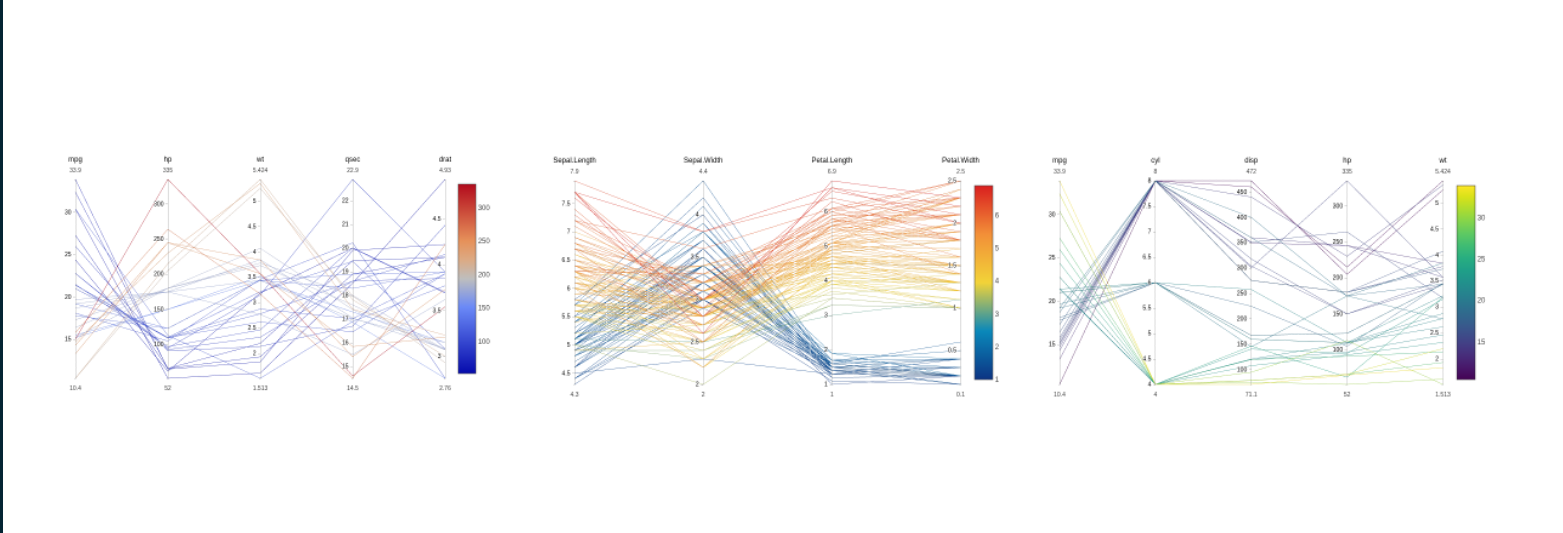
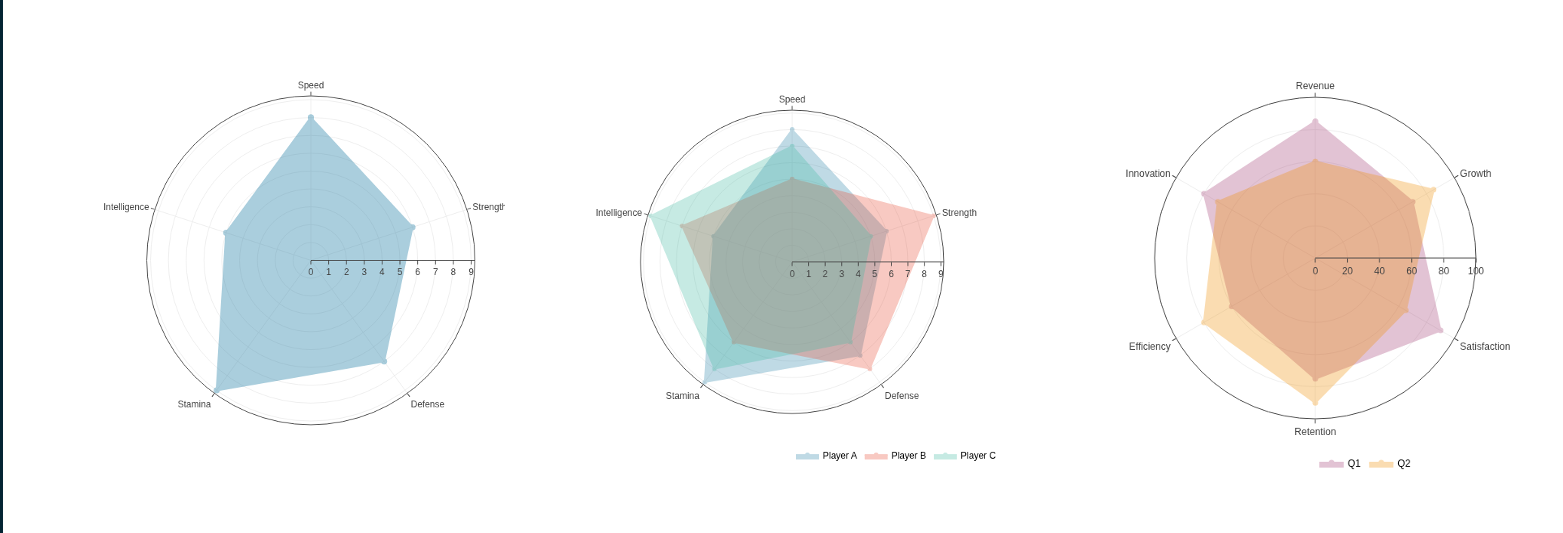
linePlot - Line plotspiePlot - Pie and donut plotsradarPlot - Radar plotsparallelCoordinatesPlot - Parallel coordinate
plotsdumbbellPlot - Dumbbell plotsThe BoxPlot, ViolinPlot, and
yPlot modules include a Stats tab that
adds pairwise statistical testing with bracket annotations directly on
the plotly figure. The underlying helpers
(compute_pairwise_stats(),
create_stat_annotations(),
apply_stat_annotations(),
generate_pair_strings(), parse_pair_strings())
are exported so you can add the same bracket annotations to any custom
plotly figure. See vignette("statistical-testing", package = "VizModules").
collect_source_data() collects the interactive plot as
HTML, its plot data, pairwise testing statistics (if applied), and UI
input values into a single list, and
create_source_download_handler() turns that into a compact
zip folder of summary data for the output plot.
create_source_download_handler() also accepts a named list
of summaries (one per plot), which is how the Figure Builder bundles
every plot on the canvas into one download.
*, **, ***,
****)p.adjust method (Holm,
Bonferroni, BH, etc.)group.by levels within each
x-axis categoryWhen using paired tests (Wilcoxon signed-rank or paired t-test), each group must have the same number of observations in corresponding order. Data should be sorted so that paired samples align row-by-row within each group.
dittoVizdittoViz is under active development, so additional modules may be added as more visualization functions are added.
To contribute a new module to the package, see the vignette for clear
guidelines: vignette("adding-a-new-module", package = "VizModules")





The developers made use of AI tools (e.g. GitHub Copilot, Claude Code) for code generation, documentation writing, and test creation. AI assistance was used to accelerate development after the initial module scaffolding and structure was in place, but all AI-generated content was reviewed and edited by human eyeballs/hands to ensure accuracy and quality. Our own hands are all over this project, and we are invested in it. Any inaccuracies, bugs, or issues are attributable to us, and we welcome contributions to help improve the package.
Generative AI tools (GitHub Copilot, ChatGPT, Claude, Gemini, Cursor, etc.) are explicitly welcome for building Shiny apps with these modules in addition to creating new modules. To do so, we recommend the use of the skills provided by the package or prefixing prompts with the below to aid LLM usage.
The package ships three Agent Skills that give an agent the package’s conventions without it having to read the vignettes first. Install them into a project with:
VizModules::use_vizmodules_skills(".")That writes vizmodules-app,
vizmodules-custom-module, and
vizmodules-new-module into .agents/skills/ by
default, where GitHub Copilot and OpenAI Codex discover them
automatically. Pass client = "copilot" for
.github/skills/ (also read by GitHub Copilot) or
client = "claude" for .claude/skills/ (Claude
Code); call the function more than once with different
client values to install into several locations at once.
vizmodules-app in particular carries a generated inventory
of every module’s column-mapping keys (x.data vs
x.by vs x.value vs var), colour
key, tab names, and stats keys, which is what an agent otherwise spends
its budget grepping for.
In rough benchmarking, vizmodules-app saves 40-60% of
token usage versus just chucking an agent at the docs/repo/prompt below
and generates a functional app in about half the time. The other skills
show more variable and modest savings (~10-20% fewer tokens), but they
tend to avoid common pitfalls and better utilize some of the more
advanced features. Skills are difficult to benchmark, as the benefits
are context-dependent and vary with the request.
For tools that cannot read local skill files, the prompt below does the same job less efficiently.
Copy the prompt below into your LLM or save it in a file (Copilot, ChatGPT, Claude, Gemini, Cursor, etc.) before asking it to build a Shiny app with VizModules. It points the model to the authoritative, locally-installed sources of truth so it can use the package correctly.
You are helping me build a Shiny application using the installed R package VizModules, which provides interactivity-first, plotly-based Shiny modules for common plot types. Before writing code, ground yourself in the package’s own documentation rather than guessing at the API.
Core concept. Every module is a trio of functions that share an
id:*InputsUI(id, ...)renders the controls,*OutputUI(id)renders the plotly output, and*Server(id, data, ...)holds the logic.InputsUIandOutputUIare separate so controls and plot can be placed anywhere in the layout.datais passed to the server as areactive(). Use thedefaultsargument to pre-fill inputs andhide.inputs/hide.tabsto lock values while hiding their controls.Where to look (all available after
install.packages/remotes::install_github): -vignette("quick-start", package = "VizModules")— start here: end-to-end walkthrough of wiring*InputsUI(),*OutputUI(), and*Server()into an app, usingdefaults, and the example*App()functions. -vignette("custom-modules", package = "VizModules")— how to extend existing modules by building wrapper modules (adding custom logic/inputs while reusing a base module). Follow the namespace pattern: process namespaced inputs insidemoduleServer(), then call the base*Server()outside it with the bareidto avoid double-namespacing. -vignette("adding-a-new-module", package = "VizModules")— how to author a brand-new module from scratch (the InputsUI/OutputUI/Server contract, conventions, and helpers). -vignette("defaults-and-hiding", package = "VizModules")— usingdefaults,hide.inputs, andhide.tabsto pre-fill or hide controls. -vignette("statistical-testing", package = "VizModules")— the Stats tab and the exportedcompute_pairwise_stats()/create_stat_annotations()/apply_stat_annotations()helpers. -vignette("custom-model-lines", package = "VizModules")— the pluggable model-line backend registry (register_model_backend()). -vignette("custom-shiny-inputs", package = "VizModules")— the reusablemultiDynamicInput()widget. - The README — overview, install, the full list of available modules, the App Factory (createModuleApp()), statistical-testing features, and summary-data export. - Per-function help pages via?— e.g.?dittoViz_scatterPlotInputsUI,?plotthis_BarPlotServer,?createModuleApp. Module help pages document exactly which underlying arguments are wired through and any omissions. Cross-reference the underlying plotting docs (?dittoViz::scatterPlot,?plotthis::AreaPlot, etc.) for the complete parameter set. Browse all docs withhelp(package = "VizModules")or the pkgdown site: https://j-andrews7.github.io/VizModules/reference/. -NEWS.md(news(package = "VizModules")) — newest features and changes.Available modules:
dittoViz_scatterPlot,dittoViz_yPlot,plotthis_AreaPlot,plotthis_ViolinPlot,plotthis_BoxPlot,plotthis_BarPlot,plotthis_SplitBarPlot,plotthis_DensityPlot,plotthis_DotPlot,plotthis_Histogram, plus the natively-implementedlinePlot,piePlot,radarPlot,parallelCoordinatesPlot, anddumbbellPlot. Each has a matching*App()function (e.g.plotthis_BarPlotApp()) you can run to see it in action.Optional building blocks (inspect their source/help in the installed package’s
R/directory or via?): - Data table / filtering module —?dataFilterUI,?dataFilterServer. - Statistical testing helpers (pairwise + omnibus brackets on plotly figures) — see?compute_pairwise_stats,?apply_stat_annotations, and the README “Statistical Testing” section; supported by the BoxPlot, ViolinPlot, and yPlot modules. - Summary-data export —?collect_source_dataand?create_source_download_handler. - App factory —?createModuleApp(every*App()is a thin wrapper around it).Rules: All plots are plotly-based; prefer the documented module arguments over hand-rolled plotting. Verify function signatures against the installed help pages before using them, and tell me explicitly if a feature you need is not exposed by a module.